
If you are enrolled at a higher education institution in Malaysia, Google AI Plus costs you nothing for 12 months, and you have until 31 December 2026 to claim it. When the 12 months end, unless you cancel, the same account is charged MYR 23.99 a month automatically.
The free year is real. What catches students out is the card Google asks for on day one, and the email address you sign in with.
So the free part is easy. Here is what you get, then the two places people slip: claiming it correctly, and month 13.
What you get for coursework
Google's students page names these. In plain terms:
- Study Notebooks. Google's line is "Create a notebook for each of your courses." One notebook per subject, your slides and notes inside it, answers drawn from that material instead of the open internet.
- Personalized quizzes. Your own notes turned into practice questions, so you test yourself on what your lecturer actually set.
- Performance tracker. Google calls it finding your growth areas: the topics you keep getting wrong.
- Gemini Live. Talk a concept through out loud when reading it again is not working.
- Deep Research and image generation. Exam prep, and turning something abstract into a picture.
The plan gives you 400 GB of storage, Gemini Omni, unlimited uploads for Study Notebooks, Visuals and Live, and 2x higher usage limits than the free tier.
Who qualifies for the Google AI Plus student offer in Malaysia
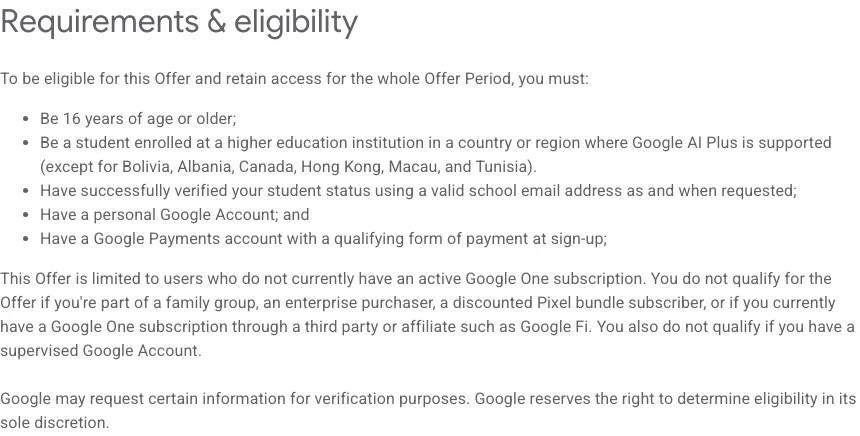 Google's Student Offer Terms, captured 23 August 2026.
Requirements & eligibility To be eligible for this Offer and retain access for the whole Offer Period, you must:
- Be 16 years of age or older;
- Be a student enrolled at a higher education institution in a country or region where Google AI Plus is supported [...]
- Have successfully verified your student status using a valid school email address as and when requested;
- Have a personal Google Account; and 5. Have a Google Payments account with a qualifying form of payment at sign-up.
Source: Google AI Plan Membership Student Offer Terms, last updated 19 August 2026
The terms also rule people out: an active Google One subscription, a family group, a company buying it for you, or a supervised account. And the offer "is not available on your school-issued Workspace for Education account."
One inconsistency: the terms say 16 and older, while Google's students page says "eligible college students ages 18+". The terms are the document that governs.
Google names no Malaysian university or college on either page, only "a higher education institution" verified by school email. Silence about your college is not a yes.
How to claim it
Google publishes no step list, only a claim button. So this is the checklist its terms require, not a walkthrough:
- A personal Google Account, signed in.
- A school email address you can open today, because Google verifies as and when it asks.
- A Google Payments account with a working card.
- Your enrolment, which the students page says must be reverified each year to keep access.
The school email trap
Two addresses doing two different jobs, and this is where sign-ups fail. Your school email proves you are a student, while your personal Google Account holds the subscription. Neither Google page explains how the two connect.
Do not sign in with your university account and claim from there. The terms shut that door in writing. Sign in with your personal Gmail, start the claim, and hand over the school address when Google asks.
What RM23.99 buys
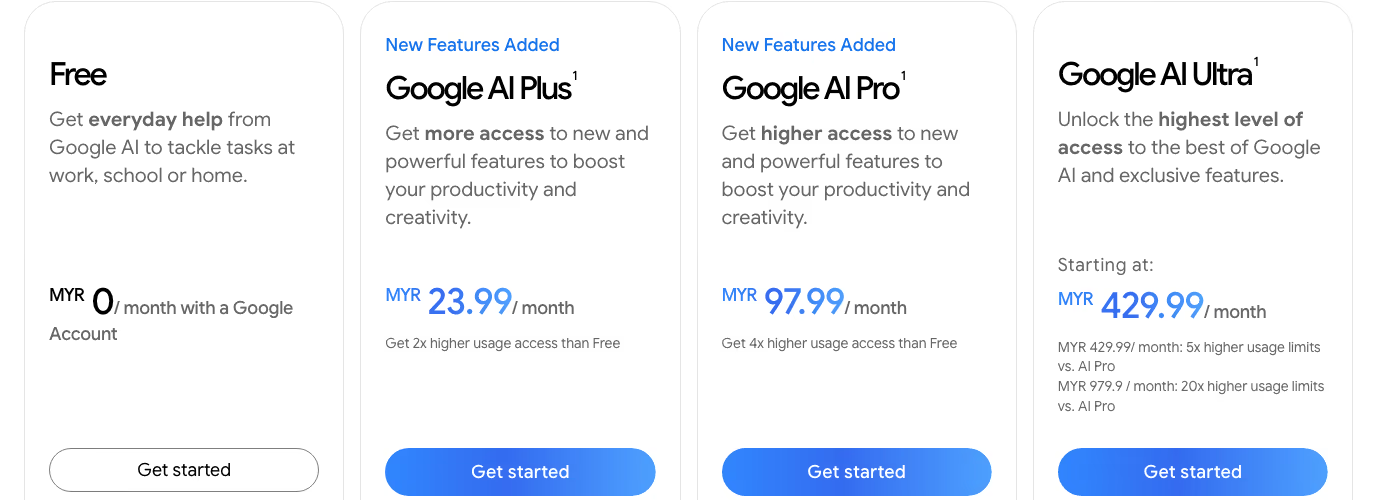 Google's Malaysia subscription page, captured 23 August 2026.
MYR 23.99 is the standard monthly price of Google AI Plus, so the free year is worth about RM288. Some coverage also set RM23.99 against MYR 97.99 as a student price for Google AI Pro. Google's help page does describe a discounted Pro plan for students, for up to four consecutive years while you stay a student. Google's Malaysia students page does not list its price, so check the amount on the checkout screen before you pay.
| Plan | Price (MYR/month) | Storage | Usage limits | YouTube Premium |
|---|---|---|---|---|
| Google AI Plus (the student plan) | 23.99 | 400 GB | 2x free tier | No |
| Google AI Pro | 97.99 | 5 TB | 4x free tier | Premium Lite |
The free year gives you Plus, not Pro.
Put month 13 in your calendar today
The fine print under the claim button reads: "Unless cancelled earlier, Google AI Plus will automatically charge MYR 23.99/month after the trial ends." The terms are blunter: "you must cancel before the end of the Offer Period."
So the moment you claim, write down the date. Set a reminder for three days before that same date next year, with the amount in the title. Google's help page says it will notify you before the plan converts, but a notice is easy to miss, so do not plan around an email.
What it will not do
It will not do your thinking. It reads fast and explains patiently, and neither is understanding the material.
Submitting generated work is your university's academic integrity problem, not Google's. Nothing in Google's terms covers your campus rules, and no AI tool takes the blame at a disciplinary hearing. Use it on the reading, not on the submission.
One thing to try first
Before you build a whole semester around it, pick your hardest subject and put only that subject's notes in for a week. If it does not help you there, it will not help across five.
We build software in Kuala Lumpur, and in a year or two some of you will be sitting across from us in an interview. The year is free. What you did with it is the part that shows.
Terms, prices and eligibility can change. Check Google's own student offer page before acting on anything here.